How to Redeem Hungry Pig Codes
What to do when codes appear—and what to claim for free while the list is empty.
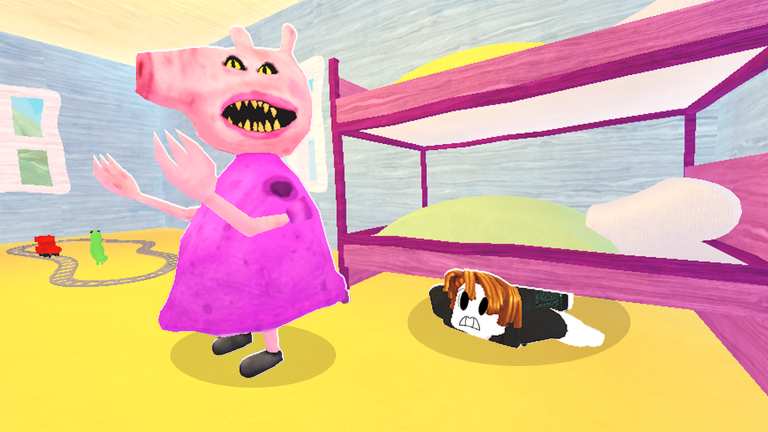
Hungry Pig does not currently offer active redeemable codes, but players still need a clear plan for the day a Codes button ships. This guide explains how Roblox promo redemption usually works, what to watch for inside Hungry Pig, common error messages, and the free alternatives you can claim today while the Codes Hub active table stays empty.
Hungry Pig is a free-to-play Roblox survival chase experience (place 18183902003, universe 6164853651) where you steal food platters from monstrous animals, sprint away, spend Points in the shop, and team up against a periodic boss. Codes—if added—will likely grant Points, shop items, or cosmetics. Until then, treat every random string online as unverified.
Current status
- Active codes: none (see the Codes Hub)
- Redeem UI: not confirmed in live servers
- Best free claim right now: WASP wings via SoundTrackZack group + liking the game
If a friend swears a code works, ask for a screenshot of the reward toast and the exact spelling. We only promote codes we can verify on this wiki.
When a redeem menu appears — expected steps
Roblox experiences usually follow a similar pattern. Once Hungry Pig adds one, use this checklist:
- Launch Hungry Pig from Roblox and wait until your character fully loads in the lobby or map.
- Look for a Codes, Redeem, Gift, or Twitter style button on the HUD (often a side icon or settings gear).
- Open the panel and find the text box.
- Copy the code from the Codes Hub—do not type from memory.
- Paste carefully: no spaces before or after, matching uppercase and punctuation.
- Press Redeem / Claim / Submit.
- Confirm the reward appears (Points counter, inventory, or a success popup).
- If the reward is a Premium-style item, rejoin the server—Hungry Pig already requires a rejoin after Premium shop purchases.
Keep a private note of codes you already redeemed so you do not waste attempts on “already used” errors.
Platform tips (PC, mobile, console)
PC
Use Ctrl+V to paste. If the cursor will not enter the box, click the field once, close any chat window, and try again. Sprint is Left Shift—do not hold it while typing in menus.
Mobile
Tap the codes icon with a clean finger press; on-screen keyboards sometimes insert autocorrect spaces. Paste from your notes app when possible. Recent patches fixed Mobile sprint—still open menus before you start a chase.
Console
If a virtual keyboard appears, enter characters slowly. Some console UIs block paste; have the code written on a second device. Server size is capped at 15 players, so noisy lobbies can make UI clicks easy to miss—pause near a safe wall first.
Full movement details live on Controls.
Troubleshooting failed redemptions
| Message / symptom | Likely cause | Fix |
|---|---|---|
| Invalid / wrong code | Typo, fake code, or expired | Recopy from Codes; check expired table |
| Already redeemed | You claimed it before | Skip; one claim per account is normal |
| Expired | Code rotated out | Wait for the next drop |
| Nothing happens | UI not loaded / wrong menu | Rejoin, wait for full load, try again |
| Rewards missing | Needs rejoin or Points refresh | Leave and rejoin Hungry Pig |
Never share your Roblox password or account cookie with “code bots.” Real redemption happens only inside the official experience or Roblox’s own flows.
Free rewards while you wait
WASP wings
- Join the SoundTrackZack group on Roblox.
- Like Hungry Pig on its game page.
- Rejoin the experience and equip the free WASP wings for flight.
Details: How to Get WASP Wings.
Farm Points instead of waiting on promos
- Follow glowing letter markers to animals.
- Steal food platters and sprint (Left Shift on PC).
- Watch the Points counter at the top and the steal counter bottom-left.
- Buy early escape tools from the Point shop—start with crowd-control picks ranked on the Point Shop Tier List.
- Save for the handgun (500 Points) when you want a reliable mid-run tool.
New players should read Getting Started and How to Steal Food before dumping Points on novelty items.
Boss timing vs code hunting
A boss spawns roughly every 10 minutes, one-shots players, and needs the whole server shooting together with free boss weapons. Do not stand still in a codes menu when the siren hits—close UI, grab the free gun, and fight. Guide: How to Beat the Boss.
Safety and scams
- Hungry Pig codes will never ask you to visit shady “generator” sites.
- Nobody legitimate needs your password to “apply” a code.
- Scripts that claim to inject codes can risk your account—read Scripts Hub warnings first.
- Premium Robux items still need a rejoin after purchase; that is normal shop behavior, not a failed code.
What to do today
- Confirm the Codes Hub still shows no active strings.
- Claim WASP wings if you have not.
- Run a clean Points farm using Shop Priority.
- Recheck this page after reading Patch Notes for any redeem UI mention.
When the first real Hungry Pig codes launch, redeem with the checklist above, then return here if something fails—we will expand screenshots and button names as soon as the UI exists.
Frequently Asked Questions
Quick answers to the most common questions.
Can I redeem Hungry Pig codes right now?
No active codes exist, and a dedicated redeem UI is not confirmed. Bookmark the Codes Hub and this guide for when the first promos appear.
Why did my code say invalid?
Most often the string is fake, mistyped, expired, or already used. Copy exactly from our Codes Hub and avoid extra spaces.
Do I need to rejoin after redeeming?
Possibly. Hungry Pig already requires rejoining after Premium shop purchases, so treat a rejoin as the first fix if rewards do not show.
Are WASP wings unlocked with a code?
No. Join the SoundTrackZack group, like the game, and rejoin Hungry Pig to claim free WASP wings.
Where should I look for new codes first?
Check this wiki’s Codes Hub, the SoundTrackZack group, and our Updates pages after major patches.